An illustration of how quickly a first dialog draft can multiply before the layout is right.
Cursor Built the Dialogs Fast. I Still Had to Fix the Layout.
On this page
I recently spent a stretch of time cleaning up an existing Streamlit CRUD application. CRUD is the dull but useful shorthand for create, read, update and delete. In practice it means a set of screens where you look at records in tables and open forms to change them.
The tables on this app did not behave the same way.
Some entities opened a modal dialog for viewing or editing. That is the floating panel that sits over the page while you work on one record. Others expanded an editing form straight into the table page itself. Same kind of job. Two different habits. It was not a crime against software. It was just inconsistent enough to be annoying once you had to live in it.
The task was practical. Standardise those interfaces. Make the tables more compact. Keep the useful information.
We talked about them. We revised them. None of the first passes was “ship this and go home.” The version that stuck borrowed from options one, three and four. That mix was a design call, not something the model decided on its own while I looked away.
That pattern showed up again later. The interesting part was not that AI could draw rectangles. It was how quickly the boring follow-through arrived once the direction was settled.
The redesign broke some of the old editing paths
The first table redesign did not preserve every existing editing flow.
Some tables still tried to open the old inline forms that no longer existed. Around five entities needed new editing modals to match the standardised approach.
This is the part people skip when they talk about AI coding tools as if the first green pass is the finished ticket. Changing the surface of a CRUD app usually means hunting the paths that still assume the old surface, then building dialog after dialog with the right fields, attributes and properties for each entity.
Where Cursor was genuinely fast
Previously I would have copied a working dialog structure and manually rewritten it for each entity. Same skeleton. Different fields. Careful, dull, easy to mistype.
Cursor knocked those repetitive dialogs out extremely quickly. It felt like the good kind of automation: the part of the job that is mostly transcription stopped taking most of the afternoon. The agent was strong at producing the next dialog once there was a pattern to follow.
Then the dialogs got too tall
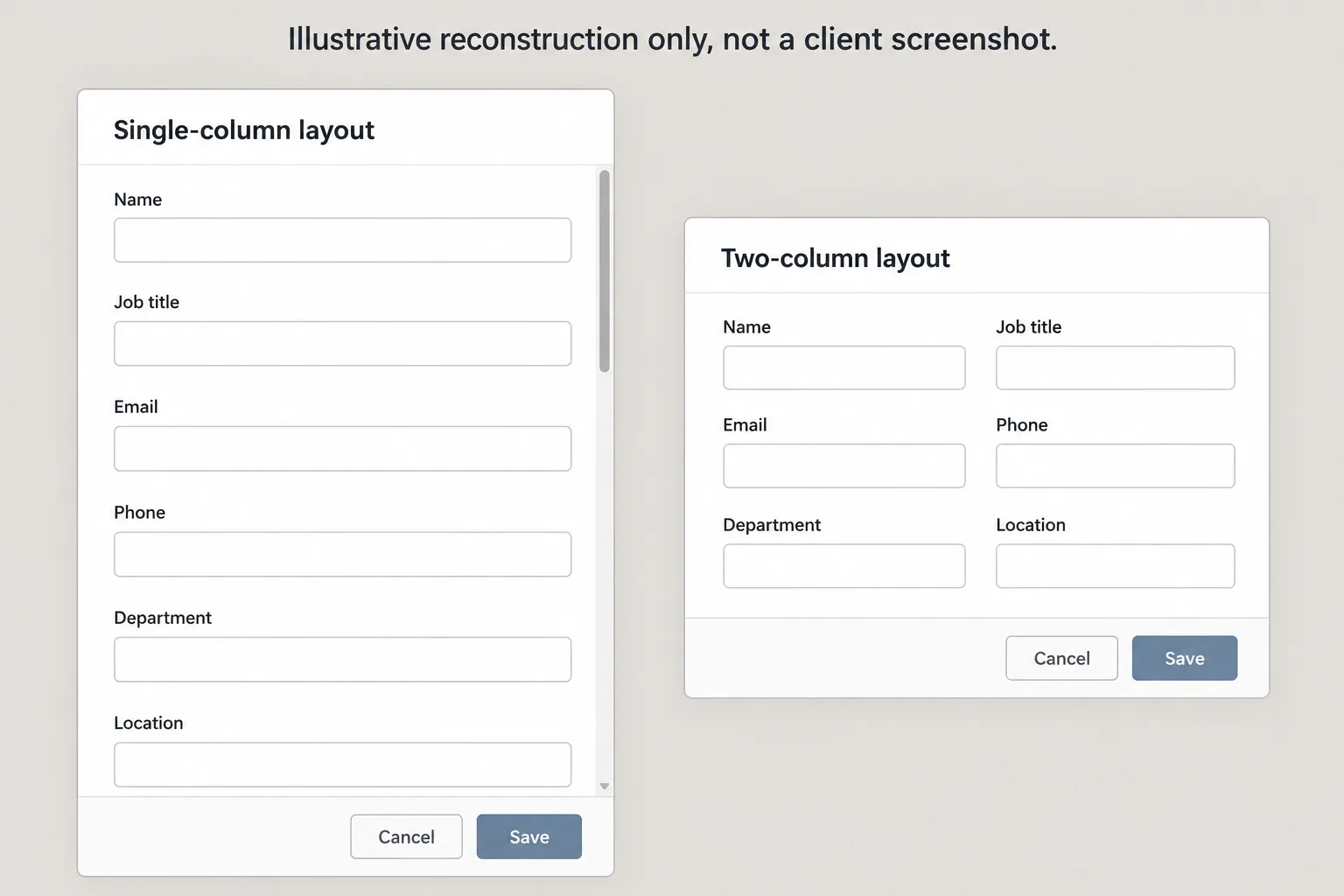
The first versions of those modals used oversized, full-width inputs for short fields. Names. Job positions. Email addresses. Things that do not need to stretch across the entire panel like a confession.
The result was unnecessarily tall dialogs and too much scrolling for no good reason.
That was the frustrating bit.
Cursor had the application. It had context documents describing the data model. It had an existing modal example. Available context did not guarantee that it would follow the established design.
I still had to correct the modal layout.
An illustrative reconstruction, not a client screenshot: tall single-column fields versus a compact two-column layout.
So the story is not “AI failed.” The story is that implementation speed and design judgment are not the same skill, even when the model can see the codebase.
Four hours on the clock
The whole task spanned about four hours, and four hours were logged against its budget. That is the project figure.
From experience receiving similar development tickets, I think a traditional ticketed workflow could have been estimated at 20 to 30 hours before you even add review or meetings. That is my retrospective estimate, not a measured comparison. A developer reusing code might still implement the first entity in around four hours and subsequent ones in roughly an hour each. The larger estimate reflects how separate tickets are often budgeted and coordinated, not some law of nature that coding must take that long.
The repetitive dialog work compressed hard once the pattern existed, and the surrounding judgment work did not disappear.
Where my attention actually went
Looking back, my useful contribution was not typing field names faster than a machine. It was gathering or creating context documents, inspecting proposed designs, discussing changes with the agent, waiting for generated changes, manually testing tables and editing flows, and catching the oversized modal layouts and correcting them.
Cursor is now central to how I develop. It substantially accelerates implementation. I do not blindly trust it, especially with design. I am still enthusiastic about it. The skill, at least on this kind of ticket, is recognising where human input is still most valuable.
Also, if you use these tools for long enough, you will hear a lot of “you’re right” and “that’s on me.” I find that both amusing and slightly irritating. Useful correction is useful. Theatrical apology is optional.
What I would do again
On a job like this I would still give the agent context and examples. I would still review the actual screen, not only the diff. I would still click every editing flow after a surface redesign. And I would still expect to make the design decisions myself.
None of that is a guaranteed method. It is just what this Streamlit cleanup rewarded.
AI can move the repetitive dialogs along at a pace that used to feel silly to do by hand. Somebody still has to notice when the short fields have been given the full-width treatment and the modal has turned into a scrollathon.