An illustration of one desk carrying more windows than a single person should.
I Pay $200 a Month for Cursor and Still Managed to Use All of It
On this page
I was using AI for development before ChatGPT was even a thing. Not modern AI development either — I mean the original GitHub Copilot, the version where you would write a comment in your code describing what you wanted, wait for a second, and suddenly some code would appear underneath it. At the time, that felt like magic. I loved it.
Then ChatGPT arrived, and weirdly, I still did not really use it by dumping entire codebases into the chat. That felt wrong to me. Instead, I would use ChatGPT to help me write better descriptions of what I wanted, then take those descriptions back into my IDE and feed them to Copilot as comments. AI helping me write prompts for another AI. Apparently I was preparing for the future without realising it.
Then this quiet little thing called Cursor appeared
Eventually Claude became a bigger deal. GitHub Copilot changed significantly. AI development tools started appearing everywhere, and somewhere in all of that, Cursor showed up. It was basically an IDE built on top of VS Code, which meant it already felt familiar. So I tried it — and then I just kept using it. That is probably the simplest explanation for why Cursor became my main development environment. There was no dramatic comparison spreadsheet, no thirty-day evaluation of every AI coding product available. I tried it, it fitted the way I worked, I stayed.
Interestingly, while I was helping coworkers set up MCPs and teaching people how to use Claude more effectively, I was still quietly sitting there using Cursor myself. Apparently I am capable of recommending one ecosystem while refusing to leave another.
I started with the $20 plan
For quite a while I used Cursor's cheaper plan, and I absolutely destroyed the usage allowance. Then I would turn on additional usage — another bit of money here, another $100 there in a particularly busy month. Eventually I looked at what I was spending and thought maybe I should move up a tier. There was a sensible middle option. Naturally, I skipped it. I went straight to the $200 Ultra plan.
My theory was presumably that having substantially more usage would mean I could stop thinking about limits. What actually happened was that I started using substantially more AI. So that went well.
Apparently giving me more capacity just makes me do more work
I do not think my usage comes from being careless. If anything, I have spent years trying to become more efficient with these tools. I use proper context documents, keep LLM context files for projects, and try to write better prompts. I use ChatGPT and Gemini to help organise rough ideas before throwing expensive model usage at them. I do not automatically pick the newest, largest model just because it exists — Cursor often has included models available, and if one of those can do the job, great. I think about context, about what information the model actually needs, and I try not to repeatedly send an entire universe of irrelevant code every time I want one button moved.
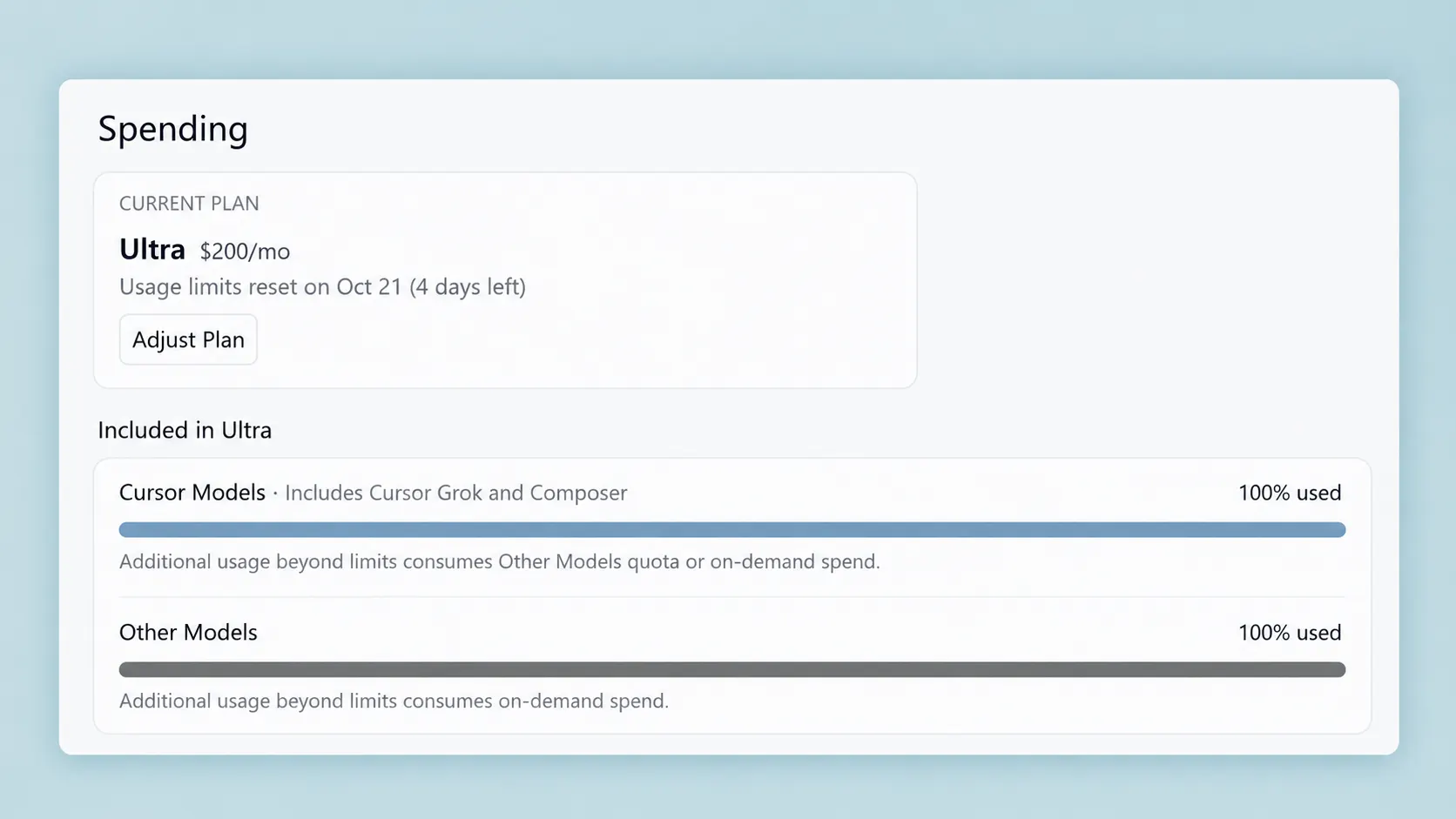
And somehow: 100% included usage. 100% other models. Beautiful.
Both included quotas sitting at 100% used.
Two billion tokens means absolutely nothing to my brain
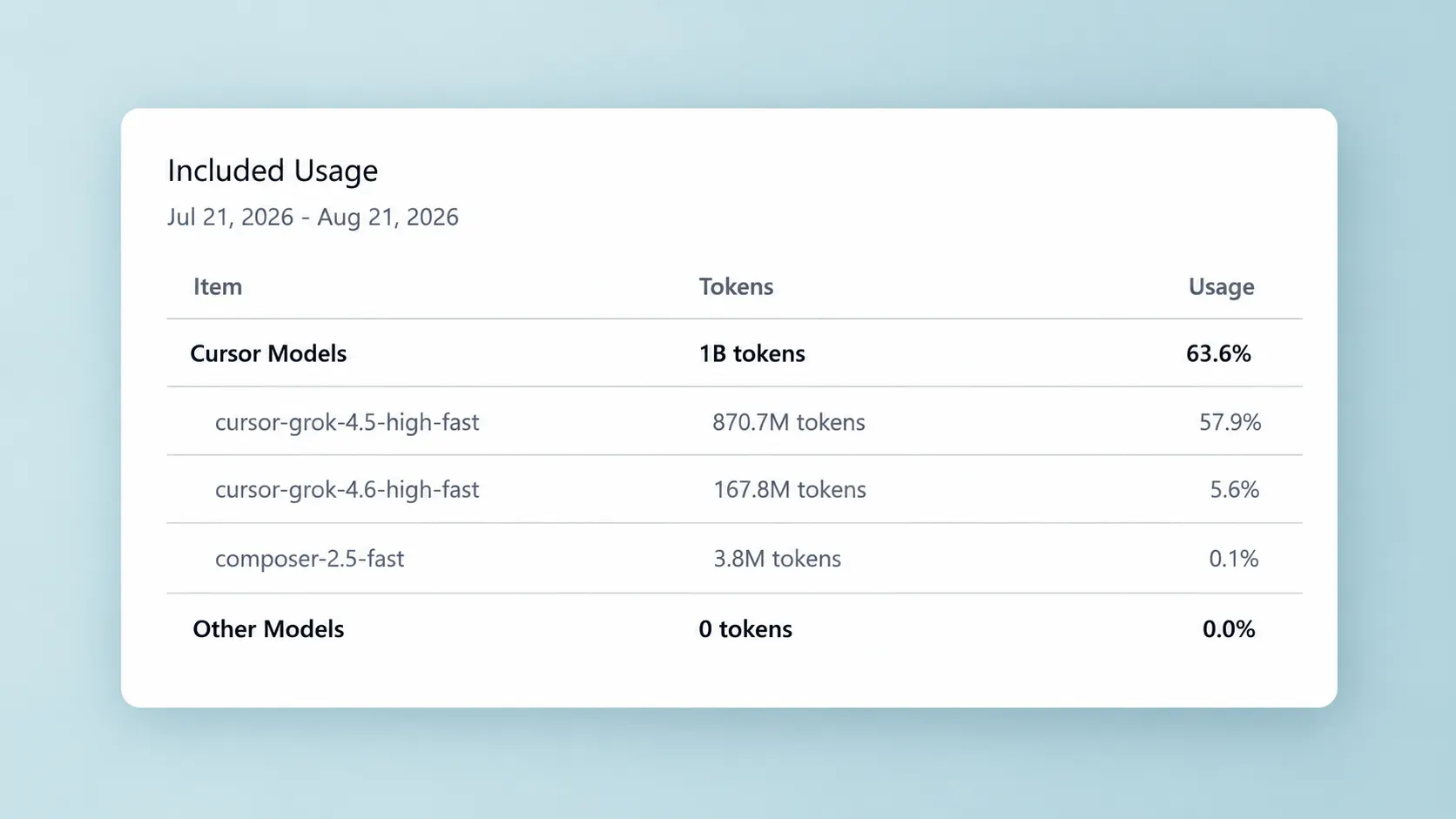
A couple of months ago I remember slowly watching my usage approach one billion tokens. That already sounded ridiculous — one billion is not a number my brain associates with writing code. Then almost immediately the next month I saw two billion. Two billion tokens. Okay. Sure.
At that point the numbers stop feeling real. It is like somebody telling you the distance to another galaxy. I understand that the number exists. I do not emotionally understand what it means anymore.
A month of token totals that stop feeling like ordinary coding numbers.
What am I actually doing with all of it?
I am not typing BUILD ME AN ENTIRE APPLICATION PLEASE and then disappearing for lunch. That would be a spectacular way to destroy your context window and probably your application at the same time. Most of my work is still broken into features, fixes, investigations, tests, refactors, documentation and reasonably contained development tasks. There is just a lot of it.
I have a full-time development job, side work, and my own projects — websites, Android apps, plugins, BigCommerce development, Shopify work, automation. And apparently every time I save an hour with AI, my response is not “Excellent. I have an hour free.” My response is “Excellent. I could start another project.”
This may be the actual problem.
AI gives me more time to be the boss
One of the biggest benefits is that I spend less time doing the mechanical parts of development. That gives me more time to manage work: plan, update tasks, manage my POD, keep documentation current, review what other people are doing, deal with project management, communicate with clients. Fantastic. More time to talk to clients — exactly what every developer secretly dreams about.
I have even built automation around some of that too. I have a Basecamp agent that can help with the project-management side of things. So naturally I am now using AI to manage some of the work created by using AI to complete more work. This seems sustainable.
There are still things I want to do myself
Testing is a big one. There are excellent automated testing tools, AI testing tools, agents that will inspect things for you — and I use automation heavily. But sometimes I still want to physically open the thing and look at it. Does it actually work? Does it feel good? Does the layout look stupid? What happens if I click this? Would a normal person understand what this button does? There is still enormous value in simply being the human using the product.
The same applies to communication. I use AI constantly to help write messages and emails, but I do not want AI to be me. If I ask for help writing an email, I will still read it, probably change something, then press Send. That final bit matters to me. I do not want to wake up one day and discover that my AI assistant has developed a more active social life than I have.
Hitting the limit is mostly funny
I have four days until my Cursor usage resets, and I have managed to hit 100% of basically everything. My first reaction was mostly amusement. I paid $200 for this — and somehow I used all of it.
There is a part of me thinking: did I actually need to do everything I did this month? Probably not. But there is another perfectly valid answer: I paid for it. I used it. And I did get a ridiculous amount done. The more important question is probably whether the output justified the pace. In my case, I think it did. I still review what I build, still correct things, still test. If I am building something for a client, I make sure it works properly and looks right. I am not dumping generated code into production and hoping nobody notices. But there is definitely a warning hidden somewhere in that usage graph.
AI does not make you immune to burnout
This is the weird part. AI reduces the amount of effort required to accomplish certain things, so logically you might assume that means less work. It does not necessarily work like that. If you are anything like me, it just increases the amount of work you believe you can take on — full-time job, side job, personal projects, a new client website, a plugin, an Android app, some ecommerce development. Sure. Why not? AI makes it possible.
Until suddenly you realise that your computer is running three projects, Cursor is doing something in another window, you are waiting for one agent to finish, and during that wait you have somehow started a completely different application. At one point I had two plugins, an Android app and a BigCommerce app all needing testing at roughly the same time. That was when I had to remind myself that I am still one person.
Even if I occasionally operate like a one-man thirty-person development team.
An illustration of operating like a one-person team with too many windows open.
So now I have a difficult weekend decision
Cursor resets in four days. It is the weekend. I could simply stop — that would be sensible. Go outside, play something, do absolutely nothing productive.
There is another option. I also have another subscription that gives me access to more Cursor usage, so technically I could connect that account to the Dev Den machine and carry on. This is the technological equivalent of finishing the biscuits in one cupboard and remembering there is another packet upstairs. I am trying very hard to pretend I do not know about the second packet. At least this weekend is supposed to be chill time.
Worst case, I can always code like it is 2018
If I genuinely need to work before the allowance resets, I can still write code. A shocking concept. I can open the files myself, read the code, write some functions, debug them, maybe even visit Stack Overflow. Is Stack Overflow still there? That was how we did things back in the old days.
Actually, go back far enough and you bought a book — a physical book. You wanted to learn Python? Here are 600 pages. Good luck. Maybe I am showing my age now.
An illustration of going back to books and reading the code yourself.
The funny thing is that this is actually an important test. If AI disappeared tomorrow, could I continue working? For me, the answer needs to remain yes.
AI has increased what developers can do
This is the part I find genuinely exciting. I think the capabilities available to individual developers now are absurd. You can work in languages you are less familiar with, understand unfamiliar code faster, prototype things you would previously have put aside because learning the entire stack would take too long, write tests faster, investigate bugs faster, produce documentation while the details are still fresh, and build integrations that would previously have required hours of reading before you even knew where to start.
That does not mean “AI knows everything, so I do not need to know anything.” I think that attitude is dangerous. You still need to understand what you are asking for, inspect the output, know when the answer is nonsense, test it, and understand how the pieces fit together. Otherwise you are not really developing software — you are gambling with autocomplete.
I think AI can make developers worse too
There is definitely another side to this. AI can make you lazy. You can ask why something works and accept whatever explanation comes back. You can paste an error into a model, copy the suggested fix, and never actually understand what broke. Then six months later someone asks why that code exists and the answer is: Erm. I don't know. ChatGPT said so. That is not good.
And I think we are going to see plenty of problems created by developers who use AI as a substitute for understanding rather than a tool for accelerating it. For me, the test is simple: if the AI disappeared tomorrow, do I understand my projects well enough to continue? Right now, yes. Every project I am working on, I understand what it is doing, what needs to happen next — I could build it manually, it would just take longer. That is where I want AI to stay.
Refusing to use AI entirely is probably a mistake too
I understand why developers are sceptical. There is hype everywhere, terrible generated code everywhere, people claiming programming is dead every six weeks. I do not buy that either. But refusing to use AI at all feels increasingly difficult to justify. It is a tool — a very powerful one. If another developer can investigate, prototype, test and document something substantially faster without sacrificing quality, eventually that difference matters.
You do not need to hand your entire job to an agent. You probably should not. But I think developers who completely refuse to learn how these tools fit into modern development are going to make life harder for themselves.
Would I recommend Cursor Ultra?
Not immediately. If somebody asked me how to start using AI for development, I would probably tell them to try Cursor's entry-level offering first, or use VS Code with GitHub Copilot. Both are good ways to experience AI inside the place where you are actually writing code. You do not need a $200 subscription because you occasionally ask AI to rename a function.
Ultra makes sense for me because I use Cursor constantly across multiple jobs and projects — and even then, apparently, I need to reconsider what I am doing next month, because somehow I used the whole thing.
Maybe the usage limit is trying to tell me something
I could look at the 100% bar and conclude that I need more AI, or I could look at it and conclude that I need fewer projects. I suspect the second answer may be healthier.
AI has definitely made me faster. I think it has also made me better in some ways because I can explore more approaches, get feedback faster and spend more time thinking about the bigger picture. But the biggest effect might simply be that it increased my ambition: I can build more, so I want to build more, then more becomes normal, and eventually I am sitting here on a $200 plan wondering how I managed to use all of it before the month even ended.
Maybe Cursor Ultra earned its money this month. Actually, I am pretty sure it did. The more important question is whether I needed to spend the entire month trying to earn mine. For now, I have four days until the reset. Maybe I should just take the weekend off.